Bash script for testing a syn6988 voice synth module
posts voice synth syn6988 bashGot a device that can do voice synth and is controlled over serial. Would like to have a simple bash script to at least test that it's working.
It's a SYN6988 and has some pretty decent voice synth capability for being an embedded module.
Learned the basic on controlling it via reading the source of this pill dispenser robot and created a bash script so I can quickly check if my module is working. Below script is confirmed to be working, but happy to hear other suggestions to make this test script more useful.
Just make sure to remember to flip the correct dip switches to set the correct baud rate.
Also note that the output sound will be quite soft, you will need to amplify it to get useful signal out of it.
#!/bin/bash

# SYN6988 basic test script
# This will simply send a small set of commands to check that speech synth is working as well as demo various soundbank sounds within it

# Adjust this to match the serial port you connected the syn6988 to
PORT="/dev/ttyUSB0"

stty -F "$PORT" 9600 cs8 -cstopb -parenb -ixon -ixoff
https://www.lcsc.com/product-detail/C2858033.html
speak() {
    local msg="$1"

    # Calculate packet length = 2 + strlen(msg)
    local len=$((2 + ${#msg}))
    local len_hex
    printf -v len_hex '\\x%02X' "$len"

    # Build & send packet
    printf "\xFD\x00${len_hex}\x01\x00%s" "$msg" > "$PORT"
    echo "Sent: \"$msg\" (len=$len)"
}

play_sound_prompt_range() {
    local start=$1
    local end=$2

    for ((i=start; i<=end; i++)); do
        printf -v padded "%03d" "$i"
        speak "[x1]sound${padded}"
        sleep 1
    done
}

echo "=== Sending test speech commands ==="

speak "[x0][t6][v5][s6][m51][g2][h2][n1] Hello World"
sleep 3

echo "=== Sending test sound prompt commands ==="
# Ref: In Datasheet SYN6988-translated.pdf
#      Refer to section 12.3.1 Sound Prompt List

speak "Now playing sound prompt beep type"
sleep 3

play_sound_prompt_range 101 124

speak "Now playing sound prompt ringtone type"
sleep 3

play_sound_prompt_range 201 209

speak "Now playing sound prompt alert type"
sleep 3

play_sound_prompt_range 301 314

speak "Now playing sound prompt credit card success type"
sleep 3

play_sound_prompt_range 401 408

echo "=== Done ==="
You can get it from LCSC but as of 2026-01-02 it's out of stock.
For my test rig I was using:
- Serial To USB TTL with 3.3v power output
- SYN6988 Speech Synth Module
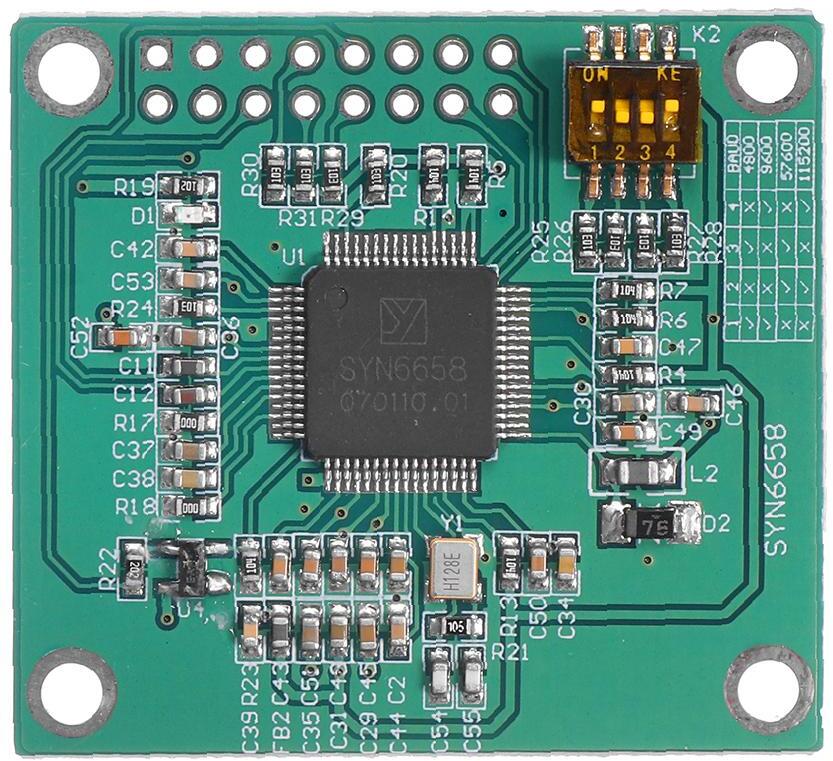
- Dip Switch Set To: On, Off, Off, On for 9600 Baud
- 42mm by 38mm
-
Left Header Row Right Header Row GND VCC GND AO_P : Audio + GND AO_N : Audio - R / B RXD RST TXD NC NC SCK SSEL MISO MOSI - VCC is powered with 3.3v
- PAM8403 Stereo Audio Amplifier Module
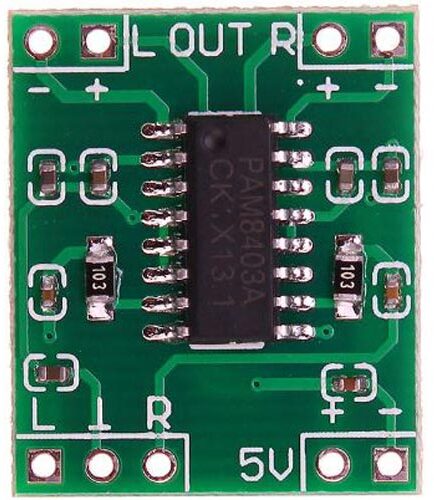
- SYN6988 output is rather soft... maybe it's a line level output? So hence we need an audio amplifier
- This module is marked as 5v in silkscreen, but can accept from 2.5v to 5.5v. Since SYN6988 is 3.3v powered, that's what I powered the speaker module for convenience. It's likely going to be softer... but in practice it's loud enough for local notification. (e.g. short range desk speaker)
- Datasheet for PAM8403 FILTERLESS 3W CLASS-D STEREO AUDIO AMPLIFIER
- Speaker
- Any small decent sized speaker will do. Too small and it will sounds very hard to hear due to distortion.
USB --- [USB to Serial] --- [SYN6988] --- [PAM8403] --- (Speaker)
Future ideas
I got a meshtastic device and my understanding is you can get it to output a serial data of chat log in the form of:
<nick0>: <chat message 0>
<nick1>: <chat message 1>
<nick2>: <chat message 2>
Documentation about the Serial Module in meshtastic
Just to make sure... I ran the below bash command
speak "nick: Hello World"
And found that it spoke nick <pause> hello world and didn't really need these [x0][t6][v5][s6][m51][g2][h2][n1] to start speaking.
This is very convenient... as I can now just plug it to the meshtastic stream output to a microcontroller acting as a glue and have it speak without needing to modify the meshtastic firmware.
Alternatively I can modify the meshtastic firmware to speak it directly and keep parts count lower.
Extra Readings
Found out later this github project TTS by jscrane that is practically the same but on as a semi-portable text to speech library. This does look a bit chunky enough that it won't fit into the meshtastic firmware project... but it's small enough that this can sustainability be ported to various microcontrollers as a stand alone text to speech module. Which is good as the SYN6988 looks to be no longer manufactured so it will become out of stock.
Do follow his project in his blog as he also appeared to have ported it to ESP8266 as well!